

Features / Surveys and NPS
Surveys
Ask your customers, or your team, in 30 seconds
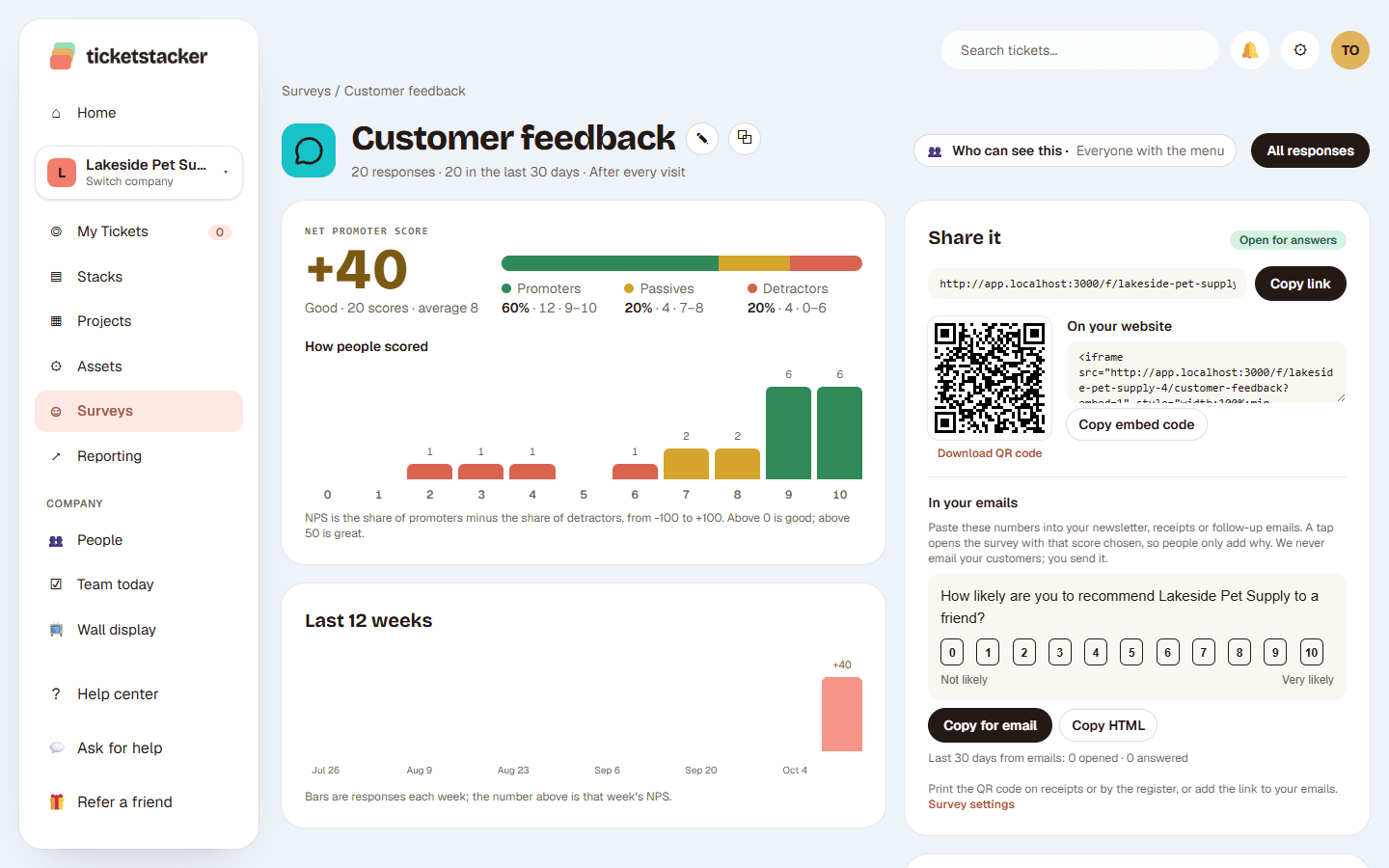
Start with the classic Net Promoter Score question and share it with the people you've just served, or with your staff. See your score worked out for you. TicketStacker never sends survey emails.
Free during the pilot
What you get
NPS, ready to go
"How likely are you to recommend us?" from 0 to 10, plus "What's the main reason for your score?"
Right after the visit
A QR code at the counter or checkout, the link in your own receipt or follow-up email, and score buttons to paste into it.
Your team, too
Change the question to "How likely are you to recommend working here?" for employee NPS (eNPS). Post the QR code in the break room.
No account needed
People answer without signing up. Name and email are optional.
Your score, worked out
Promoters minus detractors, how people scored and how your score moves week by week. Low scores that left an email are flagged for a follow-up.
You share it, we never blast it
TicketStacker never sends survey emails. No mailing lists, no bulk sends: you choose who gets it.
Questions
Can I ask my own questions?+
Yes. A survey works like any stack, so add or change any question. The 0 to 10 NPS score is a field type you can use anywhere.
Can I put the survey in my emails?+
Yes. Copy the score buttons into your own receipt, follow-up email or staff email. A tap opens the survey with that score already chosen.
Will TicketStacker email my customers?+
No. TicketStacker never sends survey emails and never keeps a mailing list. You share the survey with the people you've just served.
Who sees the results?+
Admins choose who has the Surveys menu, and each survey can be limited to the people you add.
See how it works, step by step
- Help articleSurveys and NPSAsk the customers you've just served, or your own team, with a quick survey: a QR code at the counter, a link in your own receipt or a staff chat, and see your Net Promoter Score.
- Help articleQR codes and website embedsDownload a QR code for flyers and counters, or paste the form into your own website with one line of code.
- Help articleWeb formsGive a stack a public request form, so customers and coworkers can ask without an account and every request lands as a ticket.
Goes well with
- Reports and dashboardsCharts in your brand colors, dashboards from templates, and a scorecard by email.
- Web forms and QR codesA branded form for each kind of request: link it, embed it or print it as a QR code.
- Your own fields, steps and rulesStacks with the fields, steps, rules and automatic emails each kind of work needs.
Try it with your own requests
Free while we build TicketStacker with a small group of businesses.